



AIM Patching Instructions
To patch AIM...
-
Register for an account on the Phoenix website. Pick a username, forum name, and password, use your email address, and solve the Captcha. If no error appears, you should get an authentication email in your spam box; mark this as "not spam" and verify your account.
-
Download one of the versions of AOL Instant Messenger either here or on the Phoenix download page.
-
Once you have downloaded and installed the desired version of AIM, patch as follows:
-
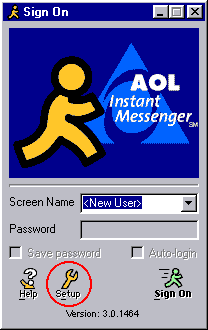
On startup, click the Setup button (shown circled in the image below).
-
Go to "Connection".
-
Replace the URL "login.oscar.aol.com" with "iwarg.ddns.net".
-
Enter your username and password, and click "Sign On". You should be able to use the program.